Select the XTOOL website you want to visit.
You will only be redirected after selecting a website.
Replacing a tire pressure monitoring system (TPMS) sensor does not always resolve a dashboard warning. If the TPMS light stays on after sensor replacement, the cause may be incorrect tire pressure, an incompatible sensor, an unreadable sensor signal, an incomplete relearn procedure, or a fault elsewhere in the system.
For tire shops and independent repair workshops, a systematic diagnostic process helps reduce repeat visits and identify the actual problem before replacing additional components. XTOOL provides TPMS service tools that can help technicians check supported sensors and perform vehicle-specific service functions.
A TPMS warning diagnosis begins by determining whether the warning indicates low tire pressure or a malfunction in the monitoring system.
First, measure all tire pressures with an accurate gauge and compare them with the vehicle manufacturer's recommended cold inflation pressures. Do not rely solely on visual inspection or the dashboard display.
The NHTSA tire safety guidance explains that underinflated tires may be difficult to identify visually and that a flashing TPMS warning followed by continuous illumination can indicate a system malfunction.
If pressures are correct but the warning remains, investigate sensor communication, stored diagnostic trouble codes (DTCs), and the vehicle's relearn requirements. On some vehicles, a malfunction indicator behaves differently from a low-pressure warning, so confirm the meaning using the owner's manual or applicable OEM service information.
TPMS sensor verification is the process of confirming that the installed sensor is compatible with the vehicle and transmits the expected identification and measurement data.
Use a compatible TPMS tool to activate or read each sensor according to the vehicle-specific procedure. Where supported, record the sensor ID, pressure, temperature, battery status, and communication result.
| Observation | What to investigate |
|---|---|
| No sensor response | Compatibility, sensor condition, activation method, or battery status |
| Sensor responds but pressure is incorrect | Actual tire pressure, sensor readings, and possible sensor issues |
| Replacement sensor has a different ID | Whether the new ID has been registered or learned by the vehicle |
| One wheel position is missing | Sensor communication, wheel-position assignment, or vehicle-side recognition |
| All sensors respond but warning remains | Relearn completion, DTCs, and other system faults |
Sensor compatibility cannot be determined from frequency alone. Confirm the required sensor type, protocol, frequency, and vehicle application before installation.
XTOOL's TPMS Tools range provides a starting point for evaluating equipment for tire-service operations. The exact sensor activation, programming, and diagnostic functions must be confirmed for the selected tool and vehicle.
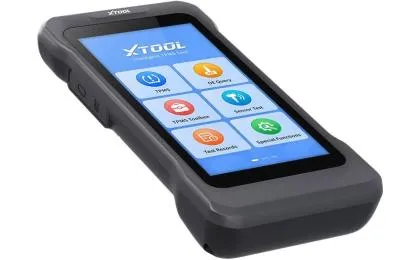
TPMS relearn is the vehicle-specific process of registering sensor IDs or associating sensor signals with the correct wheel positions when the system requires it.
Programming a replacement sensor and teaching the vehicle to recognize that sensor are not necessarily the same operation. Depending on the vehicle, a replacement may require sensor programming, an activation procedure, an OBD-based relearn, a stationary procedure, or a prescribed driving cycle.
A General Motors service bulletin hosted by NHTSA explains that sensor learning may be required after sensor replacement or tire rotation because the vehicle needs to recognize the relevant sensor IDs. The procedure varies by vehicle.
Follow the correct OEM procedure rather than repeatedly resetting the system. After the procedure, verify that the vehicle recognizes the sensors and that the expected wheel-position and pressure information is available.
XTOOL's TP150 TPMS service tool is one option to evaluate for supported sensor checks and TPMS service tasks. Confirm the exact vehicle coverage and required functions before using it for a specific repair.
TPMS repair verification is the final check that confirms the original complaint has been addressed and that the system reports the expected information under the applicable service procedure.
Before completing the job, compare the recorded sensor IDs with the vehicle's recognized IDs where this information is available. Confirm that displayed pressures are plausible, required relearn steps have been completed, and relevant DTCs have been reviewed.
If the warning persists, investigate the remaining evidence instead of assuming that another sensor replacement is necessary. A fault may involve the receiver, wiring, sensor compatibility, or another component of the vehicle's monitoring system.
The Bartec TPMS technical guidance describes how TPMS tools can read sensor information and communicate with the vehicle during diagnosis and relearn procedures.
For workshops comparing service equipment, XTOOL's XTireProbe TPMS service tool is another option to assess against the shop's diagnostic requirements and supported vehicle applications.
A useful service record should include the vehicle's make, model and year, the replacement sensor details, pre- and post-service readings, relearn results, and any unresolved fault codes. This evidence helps explain the repair to customers and makes subsequent troubleshooting more efficient.
When the TPMS light stays on after sensor replacement, the most effective approach is to verify tire pressure, confirm sensor compatibility, read the sensor data, complete the required relearn, and investigate remaining faults.
XTOOL recommends checking vehicle-specific function coverage before selecting a TPMS tool or promising a particular service outcome. Tire shops can improve diagnostic efficiency by recording the vehicle details, sensor IDs, readings, and relearn results for each repair.
Possible causes include incorrect tire pressure, an incompatible or unresponsive sensor, an incomplete relearn, or another system fault. Verify the pressure and sensor data before deciding on the next repair.
Not every vehicle follows the same procedure. Depending on the vehicle and sensor type, registration, programming, relearning, or an automatic recognition process may be required. Follow the applicable OEM instructions.
Yes. A sensor may transmit data while the vehicle has not yet learned its ID or associated it with the correct wheel position. Confirm the vehicle's recognition status and required relearn procedure.
Record the original DTCs before clearing them. Follow the manufacturer's diagnostic procedure and document the post-repair results so that the evidence is not lost.
No. Sensor protocols, frequencies, communication methods, and vehicle coverage vary. Verify compatibility for the exact vehicle and replacement sensor before performing service.
Record tire pressures, sensor IDs and readings, vehicle details, relevant DTCs, the relearn procedure attempted, and the remaining symptoms. This information helps identify the next diagnostic step and supports technical consultation.