Select the XTOOL website you want to visit.
You will only be redirected after selecting a website.
A J2534 device not detected error can prevent an automotive workshop from starting an OEM diagnostic or ECU programming session. However, the problem does not always indicate a defective pass-thru interface. The cause may involve Windows device recognition, an incompatible driver, software configuration, or communication between the interface and the vehicle.
For independent repair shops and automotive technicians, identifying the failure stage before reinstalling software can reduce unnecessary troubleshooting and downtime. This guide explains how to isolate common detection problems and what information to prepare when requesting technical support from XTOOL.
A J2534 device detection problem occurs when the computer or OEM application cannot identify or communicate with the intended vehicle communication interface at the required stage.
The first step is to distinguish three different symptoms: Windows does not recognize the hardware, Windows recognizes it but the OEM application cannot select it, or the application recognizes the interface but cannot communicate with the vehicle.
The SAE J2534 standard defines an interface between a personal computer and a vehicle communication device, allowing vehicle manufacturers' programming applications to work with compatible pass-thru hardware. However, standardization does not guarantee that every device, driver, OEM application, vehicle, and programming task will be compatible.
The SAE J2534-1 recommended practice provides the technical background for understanding this relationship.
Before troubleshooting, confirm the interface model, Windows version, OEM application, intended vehicle, and task. Review the XTOOL J2534 pass-thru device range to identify the relevant product category and verify the specific configuration required.
J2534 driver troubleshooting is the process of checking whether the correct device driver, software interface, and supported firmware configuration are installed and operating as intended.
Start with Windows Device Manager. Connect the interface according to its official instructions and inspect the relevant device entry. Record its displayed name, device status, error code, and driver version before making changes.
Next, verify that the installed driver and any required J2534 software components match the device and the OEM application's documented requirements. Avoid installing multiple driver packages or changing firmware simply because the interface is not visible in one application.
Microsoft provides a guide to updating or reinstalling Windows device drivers. For XTOOL-specific utilities, use the official XTOOL Download Center and follow the instructions for the applicable device.
The following comparison helps identify the next check without assuming that every detection error has the same cause.
| Observed symptom | What to investigate | Evidence to record |
|---|---|---|
| Interface absent from Device Manager | USB connection, power, hardware recognition | Device listing and connection method |
| Device appears with an error | Driver installation or device status | Error code and driver details |
| Windows recognizes the VCI, but OEM software does not | Supported interface, driver/API configuration, application settings | OEM application version and available interface options |
| OEM software recognizes the interface, but vehicle communication fails | Vehicle selection, connection path, supported protocols, ignition state | Vehicle details and exact error message |
VCI troubleshooting is a structured process that separates computer-side recognition issues from application-level and vehicle-side communication failures.
First, confirm the physical connection and follow the interface manufacturer's approved connection sequence. If the hardware is not recognized, investigate the computer-side connection before diagnosing vehicle communication.
If Windows recognizes the device, open the OEM application and check whether the correct pass-thru interface is available. Confirm that the software version and required interface components are supported. A visible device entry does not prove that the OEM application can use it.
If the interface is selectable but communication fails, verify the vehicle, model year, intended module, and connection requirements. Check whether the selected application supports the specific operation. Do not assume that successful identification proves that ECU programming is supported for every vehicle.
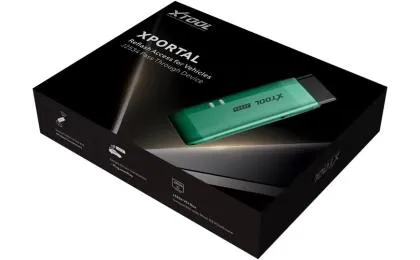
XTOOL's XPortal J2534 interface is a relevant product reference when evaluating a dedicated pass-thru interface. Confirm the applicable driver, software, and vehicle requirements before attempting a programming session.
ECU reprogramming can affect vehicle operation if interrupted or performed under unsuitable conditions. Follow the applicable OEM procedure and do not begin programming until the connection and required operating conditions have been verified.
A J2534 troubleshooting report is a concise record of the hardware, software, vehicle, error symptoms, and checks already completed.
If the problem persists, prepare the information below before contacting XTOOL technical support.
| Information | Details to include |
|---|---|
| Interface | Exact model and connection method |
| Computer | Windows version and system architecture |
| Software | OEM application name and version |
| Driver | Installed version and any displayed error code |
| Vehicle | Make, model, year, and intended diagnostic task |
| Symptoms | Exact error message and the stage where failure occurs |
| Checks completed | Connection, device recognition, and software checks already performed |
Include screenshots of Device Manager, the OEM application's interface selection screen, and the complete error message where available. Remove personal or sensitive information before sharing logs.
Microsoft's Device Manager troubleshooting documentation explains how device status and installation errors can help identify driver-related problems.
Providing these details helps the support team distinguish a driver issue from an application compatibility question or a vehicle-specific limitation. It also reduces repeated checks and makes the next troubleshooting step more targeted.
When a J2534 device is not detected by OEM software, the most effective approach is to identify where recognition fails before reinstalling drivers or changing the configuration. Separate Windows hardware recognition, OEM application detection, and vehicle communication, then record the evidence from each stage.
XTOOL recommends verifying the supported device and software configuration using official documentation before beginning vehicle programming. Workshops that prepare their interface model, driver details, OEM software version, vehicle information, and error screenshots can make technical support more efficient and reduce avoidable downtime.
Windows hardware recognition and OEM application compatibility are different stages. Check the supported driver, J2534 software components, application configuration, and device compatibility.
Use the version specified in the official documentation for your interface and intended software environment. Do not assume that the newest driver is automatically compatible with every OEM application.
Different driver packages or interface configurations may cause compatibility issues in some environments. Document the installed versions and follow the manufacturer's recommended installation procedure before removing or replacing software.
No. Recognizing an interface confirms only part of the connection chain. Vehicle communication also depends on the supported application, connection requirements, vehicle configuration, and intended operation.
Use the official XTOOL Download Center and identify the correct utility for your device. Follow the associated installation instructions rather than downloading drivers from unofficial websites.
Provide the interface model, Windows version, OEM application and driver versions, vehicle details, exact error message, screenshots, and checks already completed. This evidence helps narrow down the cause.