Email Us

XTOOL Software Services

Keep Your XTOOL Software Up to Date

Renew your software to receive system updates and monthly diagnostic packages,
or add new capabilities with a compatible feature expansion pack.

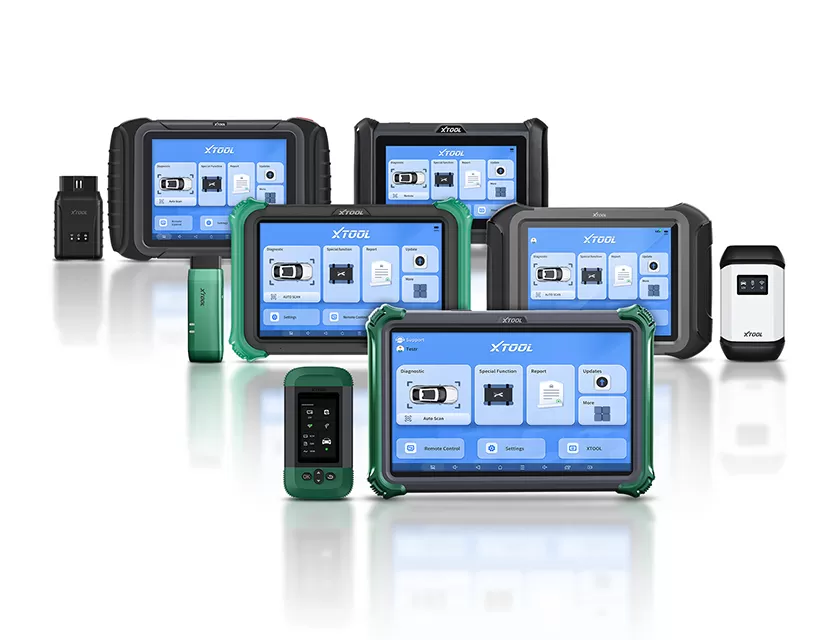
XTOOL diagnostic devices showing the software update interface

Renewal and activation are completed on your XTOOL device. Expansion availability and accessory requirements vary by device; contact XTOOL Support before purchase.

Annual Software Renewal

Keep your current software coverage active

  • System version updates included during the active term
  • One diagnostic package release per month, available in Update
  • Monthly software update details available on the official XTOOL Upgrade Guide
  • Renewal reminders on device startup and in Update
View Renewal Instructions

Feature Expansion

Explore additional capabilities for a device you already own

  • Extend the useful scope of selected previously purchased devices
  • Configure selected newer devices for a wider mix of gasoline, diesel, or electric-vehicle work
  • Availability depends on device design, hardware, market, and the function requested
  • Some functions require additional accessories
Ask About Options for My Device

Not sure which option you need? Contact XTOOL Support before purchasing.

What You Receive with an Active
Software Renewal

System updates

Receive available system version updates during your active software term.

Monthly diagnostic packages

Receive one diagnostic package release each month in Update and download it to your device.

Clear renewal reminders

Your device displays a renewal reminder when it starts and when you open Update during the active term. If the term has expired, the expiration reminder remains visible.

Monthly update information online

Active annual subscribers can review XTOOL’s published monthly software update information on the official Upgrade Guide.

The Upgrade Guide explains published monthly update content. It does not check an individual device’s subscription status, install updates, or guarantee that every listed item is available for every device.

What Happens When Your Software Term Expires?

StatusSystem updatesNew monthly
diagnostic packages
Previously
released packages
Reminder
ActiveAvailable during the active termDelivered in UpdateAvailable for downloadShown at startup and in Update
ExpiredNo new system updatesNot delivered until renewalPreviously pushed packages remain available for downloadExpiration reminder remains visible
Renewed after expirationUpdates resume according to the renewed entitlementThe latest available monthly package can be checked in UpdateAvailable for downloadStatus updates after successful activation

Exact availability may vary by device model, market, and software release. Check your device or contact XTOOL Support if the expected package does not appear.

How to Renew Your XTOOL Software

Step 1: select Renew on the renewal reminderStep 2: enter the activation code on the renewal pageStep 3: select Verify and follow the confirmation

These steps are completed on your XTOOL device. This webpage cannot open the device menu, check your subscription status, enter an activation code, or complete activation for you.

Extend the Capabilities of a Device
You Already Own

Intro

Feature expansion services help existing XTOOL owners adapt selected devices to changing workshop needs. For some previously purchased devices, an available expansion may add supported capabilities within the limits of the device hardware. For selected newer devices, expansion options may help support a broader mix of gasoline, diesel, and electric-vehicle work.

An expansion adds only the capability defined for an eligible device. It does not change the device’s hardware, processing performance, standard configuration, service life, or overall product positioning, and it does not turn one XTOOL model into another.

How to Activate an Expansion Pack

Three device steps for activating an XTOOL expansion pack

If the new function does not appear after restart, confirm device compatibility and contact XTOOL Support with your device model, serial number, and order information.

Get Guidance for Your XTOOL Device

  • Your exact XTOOL device model
  • The type of work you want to add, such as gasoline, diesel, or electric-vehicle applications
  • Whether an expansion option is available for that device
  • Whether an additional accessory is required
  • Region or market restrictions, if applicable
  • Activation-code term, refund and transfer policy

FAQ

1. What is included with an active XTOOL software renewal?

During the active term, you can receive available system version updates and one diagnostic package release per month in Update.

2. What happens if I do not renew before the expiration date?

Your device remains usable, but new system updates and monthly diagnostic packages stop until the software term is renewed. Previously delivered packages remain available.

3. Where can I see what XTOOL updates each month?

See the official Upgrade Guide for published monthly update notices and downloadable editions.

4. Is a software renewal the same as a feature expansion?

No. Renewal keeps eligible software coverage active. A feature expansion adds a defined capability to a compatible device.

5. How do I renew or activate on my device?

Purchase the correct activation code, open the renewal or Redeem Code screen on your device, enter the code, and follow the on-screen confirmation.

Need Help Choosing the Right Software Service?

Contact XTOOL Support or an authorized seller before purchase if you are unsure about device compatibility, accessory requirements, or the correct activation code.

Contact XTOOL Support
  • Tel:
  • Email:
  • Add:
    17&18/F, A2 Building, Creative City, Liuxian Avenue, Nanshan District, Shenzhen, China
Contact Us