Select the XTOOL website you want to visit.
You will only be redirected after selecting a website.
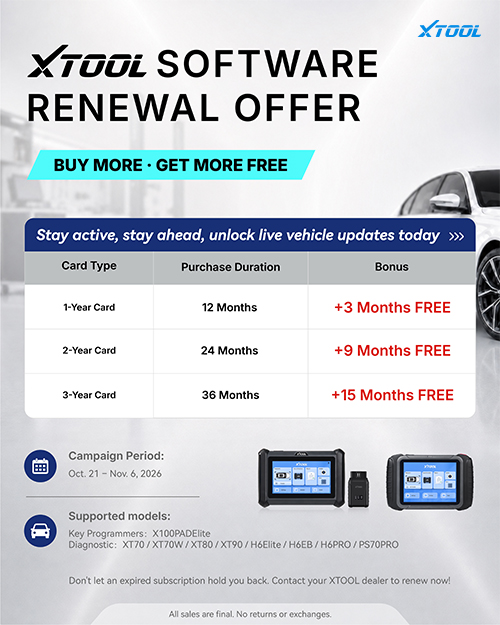
Get more software service time for the XTOOL device you already own. From October 21 to November 6, 2026, XTOOL's limited-time software renewal offer adds 3, 9 or 15 bonus months to eligible 1-year, 2-year or 3-year renewal cards.
For workshops and automotive locksmiths planning their next renewal, the offer provides a longer service term with the selected card. Start with your device model and current software status, then contact your XTOOL dealer to confirm the right renewal option.
Offer at a glance
- 1-year renewal card: 12 months + 3 bonus months = 15 months total.
- 2-year renewal card: 24 months + 9 bonus months = 33 months total.
- 3-year renewal card: 36 months + 15 bonus months = 51 months total.
- Campaign period: October 21–November 6, 2026.
The bonus depends on the renewal card you choose. Use the total service term below to compare the options before contacting your dealer.
| Renewal card | Standard term | Bonus term | Total service term |
| 1-year | 12 months | 3 months | 15 months |
| 2-year | 24 months | 9 months | 33 months |
| 3-year | 36 months | 15 months | 51 months |
Choose a term that fits how long you plan to keep the device in regular use.
Ask your dealer to confirm device eligibility, local pricing and the resulting service dates before purchase.
During an active term, XTOOL provides available system version updates and a monthly diagnostic package release in Update. Actual availability varies by device, market and release. The XTOOL software renewal guide explains these benefits and the on-device renewal process.
When a term expires, new system updates and new monthly packages stop; previously pushed packages remain downloadable. Renewing restores eligible update access. A feature expansion is a separate service for adding a specified capability to a compatible device.
Before choosing a card, review three practical details:
Your exact model. Use the full model name when requesting a quote so your dealer can identify the appropriate renewal card.
Your current service status. Check the software service information on your device. Ask how the selected card and bonus months will affect your service dates, particularly if your existing term is still active.
Your workshop's requirements. Tell your dealer which vehicles or tasks matter to your business. Confirm the relevant software support rather than assuming a longer service term includes every function you may need.
These details help you compare the offer on the basis of the equipment you own and the work you expect to perform. If you manage several devices, review each one separately before ordering renewal cards.
1. Prepare your device details. Have your model, serial number and current software status ready for your dealer.
2. Confirm the offer.Ask which campaign renewal option applies to your device, what it costs locally and how the bonus months are applied.
3. Arrange your renewal during October 21–November 6, 2026. Obtain the appropriate activation code and follow the renewal instructions on your device.
The service webpage provides guidance; activation takes place on your XTOOL device. Confirm the displayed service information after completing the process, and contact your dealer if it differs from your order.
All campaign sales are final. No returns or exchanges. Confirm the model, card and service term before purchase.
Choose a renewal term that fits your plans for the device already working alongside your team.
Explore the XTOOL software renewal options and activation guide, then contact your XTOOL dealer to confirm eligibility and arrange your renewal during the campaign period.
Writer: Anastasia ZHANG